

How credits work
Every day in Applet, you get 1 free credit.
If unused, it does not rollover, but you will get a fresh 1 free credit the next day (and the day after 😉).
This article explains how to get the most out of your credits, to top them up, and more about how credits work in general.
What are credits? Copied! Link to this section
Credits in Applet are effectively how you pay the AI model. Each time you send a prompt (text or with visual elements from the board) and Applet replies or makes changes, that uses credits.
The number of credits used will depend on a number of factors:
- The length of your prompt
- The model you choose (Fast, Pro, or Max)
- The mode you're in (build or plan)
- The complexity of the changes the model is making
There is no fixed cost per prompt; you only pay for what you actually use.
For a quick rough idea - the average prompt sent in applet and the resulting changes, costs 0.09 credits.
For something more tangible, I built this mini-game with animations, music, and persistent scores over a total of 37 prompts for a total cost of 6.20 credits
Prompts sent in plan mode (where Applet isn’t making any changes) are cheaper, so we recommend hashing out the details before you get into building. 👌
Credits are applied to your personal account and you can use them in any workspace (including the free daily credits).
Note: When you share an applet, anyone else making changes will use their personal credits.
Example spend Copied! Link to this section
Because Applet lets you choose the model you’re working with, there’s always some variance in the cost - these examples break down how many credits are used, by model for a couple of simple prompts.
For these tests, the lowest level of thinking effort was applied.
- Fast: 0.04 credits
- Pro: 0.09 credits
- Max: 0.15 credits
- Fast: 0.02 credits
- Pro: 0.15 credits
- Max: 0.11 credits
This was a simple one-off test to demonstrate the variability in the models. AI is unpredictable by nature, so your results may vary.
Context, and its impact on credits Copied! Link to this section
The longer you spend building your app, the more “context” Applet needs to know. This is the history of all your prompts and any changes it has made. As this gets larger, there’s more processing being done by the model, so you may find the cost of your prompts increasing.
Applet works with the models to cache as much context as possible, and sometimes (to reduce this cost) condenses the context to only the most useful info. While it's not currently possible to reset or remove the context, you can:
- Copy to a new applet. If you copy your current applet to a new one it has the code, but not the full chat history, so you’re effectively resetting the context and there’s not as much info being sent to the model with each prompt.
- Start a new branch. If you're running into issues with your build, or not getting the desired result, going back to the last working version and starting a new branch from there, will effectively remove the failed steps from the context.
Note: Switching models during an applet build will cause all of the existing context to be resent, so you may see a spike in credits used for the first prompt with a new model.
Adding more credits Copied! Link to this section
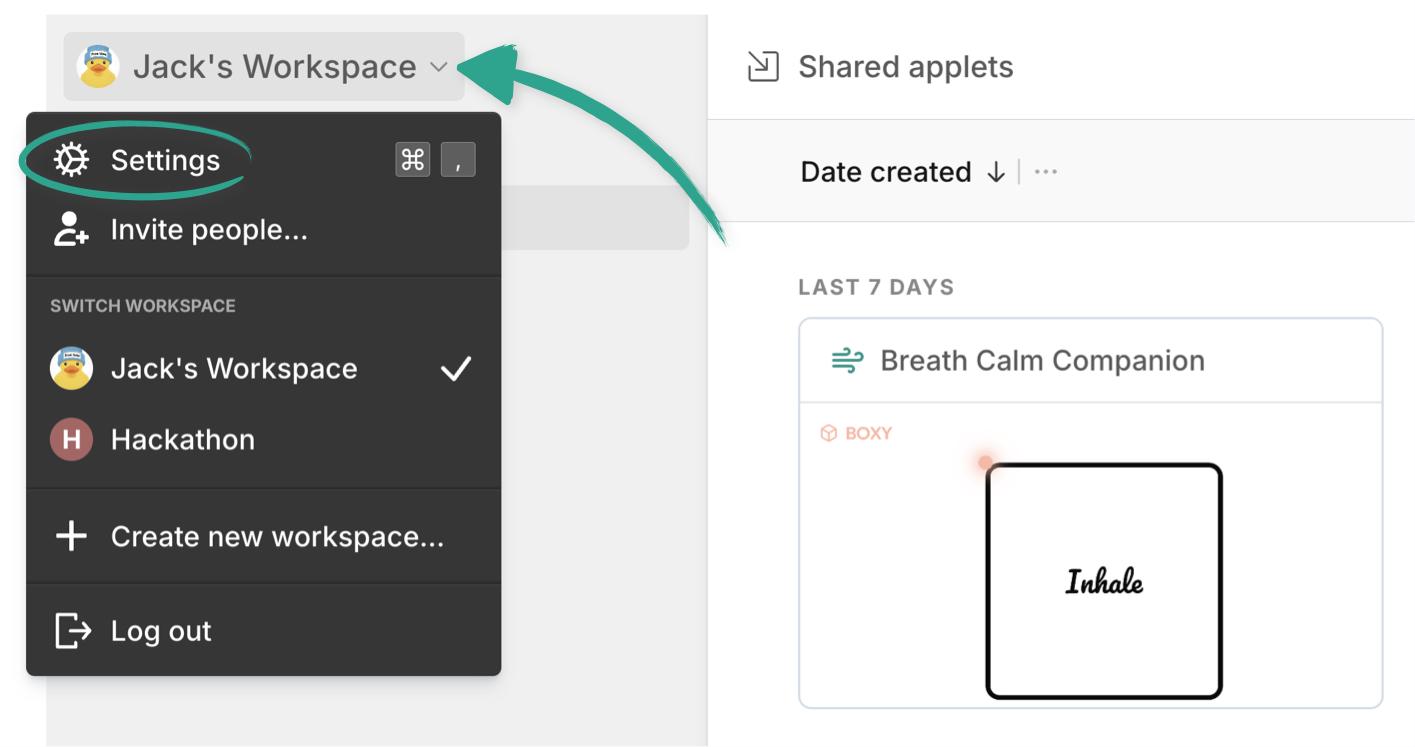
If you ever run out of credits you can add more under your billing settings, which you can find in the command menu (Command or Ctrl + K) or by clicking on your workspace name in the top left corner:
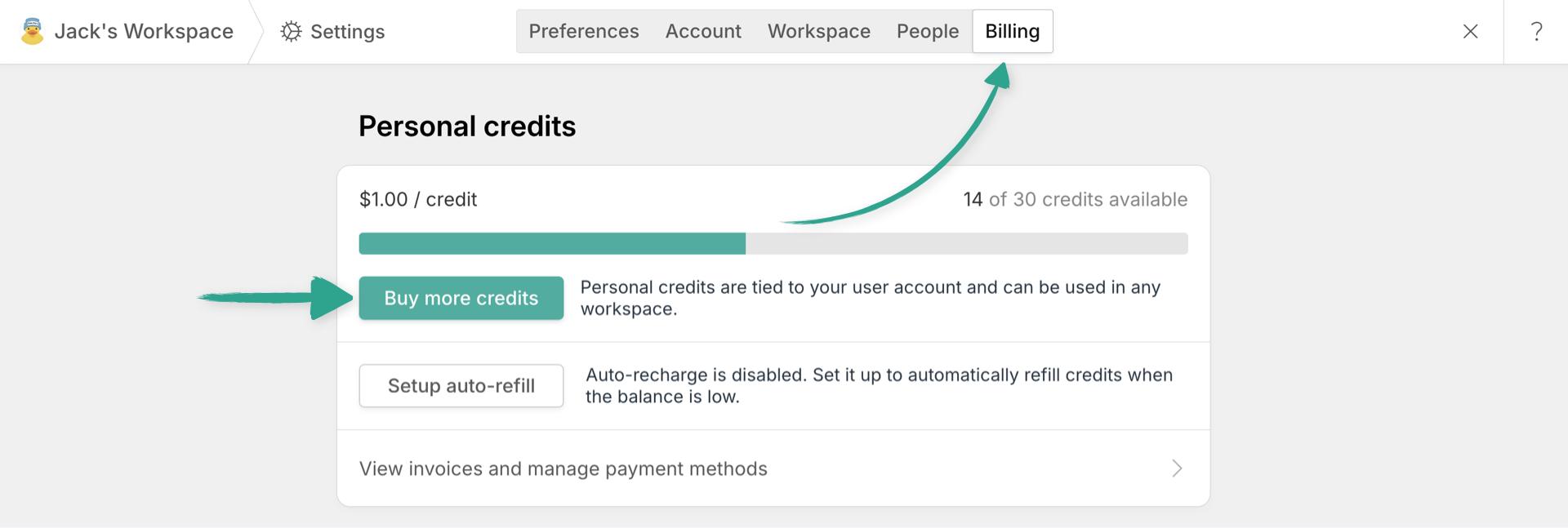
Simply switch to the billing tab and click “Buy more credits”.
Choose between 25 credits for 25 dollars, or 100 credits for 95 dollars. You can also set up Applet to auto-refill your credits whenever the balance goes below 10 credits.
Enter your credit card details and you’re good to go. 🚀